
Find out how to securely import and export encrypted key material with OVHcloud KMS using asymmetric RSA key wrapping (BYOK).
Objective
Bring Your Own Key (BYOK) lets you import and export cryptographic key material with OVHcloud Key Management Service (KMS) without sending it in plaintext. An RSA transport key pair protects the material in transit: the public key wraps it, and only the holder of the private key can unwrap it.
This guide explains how to import and export a key with OVHcloud KMS using asymmetric RSA key wrapping (BYOK).
KMIP BYOK is not available yet. This guide covers only the regional REST API, the OKMS CLI and the Go SDK.
Keys created with the HSM protection level cannot currently be used for BYOK, either as transport keys or as the key material being wrapped.
Requirements
- An OVHcloud customer account.
- An OVHcloud KMS ordered.
- An authentication method configured for the OKMS data plane (Personal Access Token, service account, or access certificate).
- The ability to apply an IAM policy on your OKMS domain; the BYOK actions required are listed in Configure IAM for BYOK.
- Optional: the OKMS CLI or the Go SDK installed for the tabbed examples.
Instructions
Understand the RSA wrapping ceremony
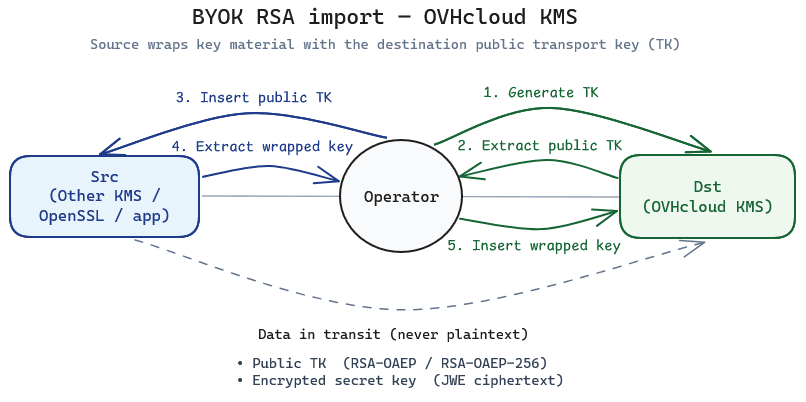
The ceremony involves two environments and an operator:
- Destination (Dst): your OKMS domain, where the imported key will be stored.
- Source (Src): the system that currently holds the key material (another KMS, an application, or a tool such as OpenSSL).
- Operator: the entity with the permissions to access both the OKMS domain and the source of the key to import. This can be a human using the OKMS CLI, or a service acting through the API.
- Generate an RSA transport key pair on the OVHcloud KMS with the
wrapKeyandunwrapKeyoperations. - Export the public transport key from the OVHcloud KMS.
- Import the public transport key in the source environment.
- On the source, export the key material wrapped (encrypted) with the transport key using either
RSA-OAEPorRSA-OAEP-256. - On the destination, import the wrapped key with
POST /api/{okmsId}/v1/servicekeyand awrappedKeyspayload. The KMS unwraps the ciphertext with the private transport key and stores the resulting service key.
Keys imported this way have never_extractable set to false, because the material existed outside the KMS before import. To extract a key later in wrapped form, set extractable to true and follow Export a wrapped key.
You need two values from your OKMS domain to follow this guide: its regional endpoint and its okmsId. The REST API calls carry both in the URL, while the OKMS CLI and the Go SDK take them from their configuration. Both are returned by the following API call:
They are also displayed in the General information tab of your OKMS domain dashboard.
Prefer this ceremony over plaintext key import whenever the key must remain trusted during transit.
Configure IAM for BYOK
Apply a policy to your OKMS domain resource. Its URN is displayed in the General information tab of your OKMS domain dashboard. Replace <identity_urn> and <okms_urn> with your values. Create policies via the OVHcloud Control Panel or the OVHcloud API.
BYOK import — read, create or import service keys, and unwrap with a transport key:
BYOK export — import a public transport key, update extractability, and wrap a key for export:
For import, serviceKey/unwrapKey must be allowed on the RSA transport key referenced by wrappingKeyId. For export, import the destination public transport key first (create / import), then allow serviceKey/wrapKey on that transport key and serviceKey/get on the key being exported. serviceKey/update is required to set extractable before (and after) the export.
Create the RSA transport key on the destination KMS
Create an RSA key dedicated to wrapping. For the import ceremony, set both wrapKey and unwrapKey on this key; they are mutually exclusive with sign and verify.
Supported RSA key sizes: 2048, 3072 or 4096 bits.
SOFTWARE is the default protection level, so you do not need to set it.
Save the returned key id — you need it as wrappingKeyId during import.
Obtain the public transport key
Export the public part of the transport key and provide it to the source environment. Never share the private key — it remains inside the destination KMS.
The response includes the public key material in the keys array (JWK).
Or export as JWK:
Wrap the source key material
On the source environment, encrypt the key material with the destination public RSA key.
This step happens outside OVHcloud KMS: use a JOSE library on the source environment.
Supported wrapping algorithms (RFC 7518):
| Algorithm | Description |
|---|---|
RSA-OAEP |
RSAES-OAEP with SHA-1 |
RSA-OAEP-256 |
RSAES-OAEP with SHA-256 (recommended) |
keyFormatType describes the format of the plaintext key material before wrapping and after unwrapping. The ciphertext is always a JWE Compact Serialization string (the wrapping algorithm is carried in the JWE header).
keyFormatType |
Typical use |
|---|---|
RAW |
Symmetric (oct) keys as raw bytes |
JWK |
JSON Web Key document (RFC 7517) |
PKCS1 |
RSA key material in PKCS#1 encoding |
PKCS8 |
Private key material in PKCS#8 encoding |
After wrapping with the destination public key, send the resulting JWE Compact Serialization ciphertext in the import request. For a Go example of this wrapping step, see End-to-end example in Go.
Import the wrapped key
Call POST /api/{okmsId}/v1/servicekey with a wrappedKeys array instead of plaintext keys.
| Method | Path | Description |
|---|---|---|
| POST | /api/{okmsId}/v1/servicekey | Create, import, or wrapped-import a service key |
| Field | Required | Description |
|---|---|---|
name |
Yes | Display name of the imported key (1–32 characters) |
wrappedKeys |
Yes (for BYOK) | Array of wrapped key blocks |
operations |
Yes | Intended usages of the imported key |
extractable |
No | Whether the key can later be exported (false by default; public-only keys default to true) |
type / size / curve
|
No | Inferred from the decrypted material when wrappedKeys is present |
Each wrappedKeys entry:
| Field | Required | Description |
|---|---|---|
keyFormatType |
Yes |
RAW, JWK, PKCS1, or PKCS8
|
wrappingKeyId |
Yes | UUID of the destination RSA transport key |
ciphertext |
Yes | Encrypted key material as JWE Compact Serialization. The JWE header must set alg to RSA-OAEP or RSA-OAEP-256 and enc to A256GCM. |
You can import a public key on its own (class becomes PUBLIC_KEY) or a private key (the KMS reconstructs the public part; class becomes KEY_PAIR). Symmetric material is stored as SECRET_KEY.
IAM actions on this call: okms:apikms:serviceKey/create, okms:apikms:serviceKey/import, and okms:apikms:serviceKey/unwrapKey on the transport key.
keyFormatType values: RAW, JWK, PKCS1, or PKCS8.
The last argument (KEY in okms keys import NAME KEY) is the JWE Compact Serialization string. Pass it as @path/to/wrapped.jwe, inline, or - to read from stdin.
--wrapped-key-format values: JWK (default), RAW, PKCS1, PKCS8.
Supported keyFormat values: types.RAW, types.JWK, types.PKCS1, types.PKCS8.
Verify the imported key
Confirm that the key exists and matches the expected type and operations.
Check that:
- the key
stateisactive— activate it if your workflow requires it. -
type,size, andoperationsmatch what you intended. - sensitivity attributes under
attributesreflect an imported key (never_extractableisfalse).
You can then use the key for encrypt, decrypt, sign, or verify as documented in Using OVHcloud Key Management Service (KMS).
Export a wrapped key
Secure export is import in reverse: OVHcloud KMS encrypts the key material with an RSA transport key and returns only a JWE ciphertext. The private transport key must live in the destination environment — here the external system receiving the key, not OVHcloud KMS — so only that environment can unwrap the material.
Understand the export ceremony
- Generate an RSA transport key pair on the destination environment (another KMS or tooling that will receive the key).
- Import the destination public transport key into OVHcloud KMS with the
wrapKeyoperation (SOFTWAREprotection level). This key is thewrappingKeyIdused at export time. - On OVHcloud KMS, set
extractabletotrueon the service key just before export, then export it wrapped by that transport key. Revertextractabletofalseafterwards when possible. - Transfer the ciphertext to the destination and unwrap it with the destination private transport key.
Do not generate the export transport key pair on OVHcloud KMS. If the private transport key stayed in OVHcloud KMS, the destination could not unwrap the ciphertext. Only the public half is imported into OVHcloud KMS for wrapping.
The transport key referenced by wrappingKeyId must be a SOFTWARE RSA key in the same OKMS domain with the wrapKey usage. Sensitive keys (AES/oct and private RSA/EC material) can only be extracted after wrapping; plaintext extraction is not supported for them.
Import the destination public transport key into OVHcloud KMS
Register the destination public key so OVHcloud KMS can wrap the exported key with it. Import it as a public-only RSA key with wrapKey (no private material).
Or import it directly from an *rsa.PublicKey:
Save the returned key id as wrappingKeyId.
Enable extraction
The key you export must be extractable. Prefer setting extractable to true only for the export operation (via PATCH), then set it back to false afterwards. Keep keys non-extractable at creation whenever possible: making a key extractable permanently sets never_extractable to false.
NOTE: Enabling extraction reduces the key's protection boundary. Only set extractable to true when you need to migrate the key, and revert it to false afterwards when possible.
IAM action: okms:apikms:serviceKey/update.
After a successful wrapped export (see Export the key wrapped by the transport key), disable extraction again:
Export the key wrapped by the transport key
Call GET /api/{okmsId}/v1/servicekey/{keyId} with the wrapping query parameters below. When these parameters are present, the API returns wrappedKeys instead of plaintext keys.
| Query parameter | Required | Description |
|---|---|---|
wrappingKeyId |
Yes | UUID of the destination public transport key imported into OVHcloud KMS |
wrappedKeyFormat |
Yes |
RAW, JWK, PKCS1, or PKCS8 — plaintext format before wrapping |
wrappingAlgorithm |
Yes |
RSA-OAEP or RSA-OAEP-256
|
| Method | Path | Description |
|---|---|---|
| GET | /api/{okmsId}/v1/servicekey/{keyId} | Get metadata, or export key material in wrapped form |
IAM actions: okms:apikms:serviceKey/get on the exported key, and okms:apikms:serviceKey/wrapKey on the transport key.
Example response shape:
Without --output json, the CLI prints the JWE ciphertext. With --output json, it prints the full wrappedKeys array.
Supported wrapping algorithms: types.RSAOAEP, types.RSAOAEP256 (recommended).
Unwrap the ciphertext on the destination
Transfer the ciphertext to the destination environment. Unwrap it with the destination private transport key (the counterpart of the public key you imported into OVHcloud KMS).
- If the destination is another OKMS domain, import the wrapped material there with
wrappedKeysas in Import the wrapped key, using that domain's transport key ID aswrappingKeyId. - If the destination is an external system, use its native unwrap / import API with the private transport key and the same
keyFormatType/ wrapping algorithm you used at export.
End-to-end example in Go
The following examples run both ceremonies on an RSA key pair, using the Go SDK for the OVHcloud KMS calls and go-jose for the JWE operations outside OVHcloud KMS. Both examples encode the key material in PKCS#8 (DER), which matches the keyFormatType value PKCS8.
Import a locally generated key
The program generates the key with the Go standard library, wraps it locally with the public transport key, then imports it. The key never reaches OVHcloud KMS in plaintext.
The JWE content encryption algorithm (enc) must be A256GCM.
Export a key and decrypt the JWE
The destination (here, the local program) generates the transport key pair, imports only its public part into OVHcloud KMS, then decrypts the exported JWE with the private part.