
Find out how to create, use, and revoke Personal Access Tokens (PATs) for OVHcloud IAM local users via the Control Panel, API, or CLI.
Objective
Personal Access Tokens (PATs) let an OVHcloud IAM local user authenticate with the OVHcloud API and product backend APIs without sharing their login credentials. A PAT is a bearer token whose permissions are defined by the IAM policies attached to the user.
Unlike service account credentials, which are designed for machine-to-machine interactions, PATs are intended for scripts or applications acting on behalf of a local user.
This guide explains how to configure a Personal Access Token (PAT) for an OVHcloud IAM local user.
Requirements
- An OVHcloud customer account.
- A local IAM user, or permission to create one.
- IAM policies granting the user the actions required for your use case.
OVHcloud Control Panel Access
- Direct link: Local users
-
Navigation path:
Identity, Security & Operations>Identities>Local users
Instructions
Understand Personal Access Tokens
PATs are linked to a single local user identity. When you use a PAT, API calls inherit that user's permissions based on the IAM policies applied to them.
Key characteristics:
-
Authentication scheme: Bearer token (
Authorization: Bearer <token>). - Expiration: By default, a PAT does not expire. You can optionally set an expiration date when creating it.
- Revocation: Delete the PAT at any time to immediately revoke access.
- One-time display: The token value is only shown once at creation. Store it securely.
If you need credentials for automated, production-grade integrations that are not tied to a human user, use a service account instead.
Create a Personal Access Token
Replace {user} with your local user login (for example, 1234-567-89/johnsmith).
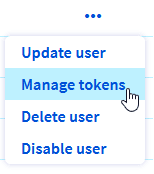
From the IAM Identities page, click the more options … button at the end of the local user row, then select Manage tokens.
On the Manage Tokens page, click Add a token, then fill in the required fields:
| Field | Details |
|---|---|
| Name | A unique name to identify the token (for example, pat-my-script). |
| Description | A short description of how the token will be used. |
| Expiry date | Optional. Disable the toggle for a non-expiring token, or set a duration or a fixed date. |
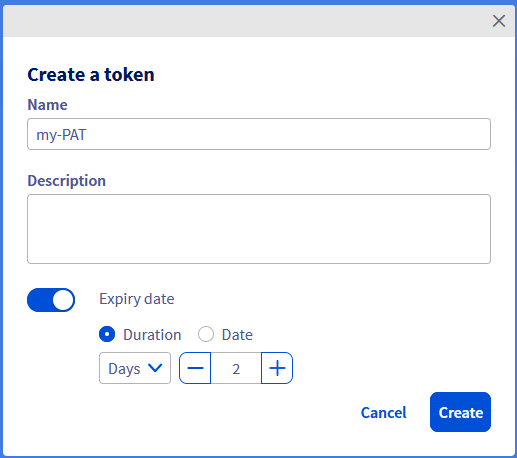
Click Create to generate the token.
NOTE: Copy the token value immediately and store it in a secure location. It will not be displayed again.
Use the following API call:
With the following payload (fill in your own values):
The API returns a response similar to the following:
NOTE: Save the value of the token field securely. It cannot be retrieved later.
To set an expiration date, add an expiresAt field to the payload using the RFC3339 format (for example, "expiresAt": "2026-12-31T23:59:59Z").
Use the OVHcloud CLI to create the PAT:
The CLI returns the token value:
To store the token directly in an environment variable:
To create a token that expires after a set duration, use the --expiresIn flag (value in seconds) or --expiredAt (RFC3339 date).
Use a Personal Access Token
Use the PAT as a Bearer token in the Authorization header of your HTTP requests.
To retrieve information about your OVHcloud account:
Use the following API endpoint: https://api.us.ovhcloud.com/1.0/
For product backend APIs that do not support the Bearer scheme, you can use hybrid authentication by prefixing the username with pat_jwt_ and supplying the token as the password:
Replace <any_suffix> with any ASCII string to identify the token.
Manage and revoke tokens
List existing tokens
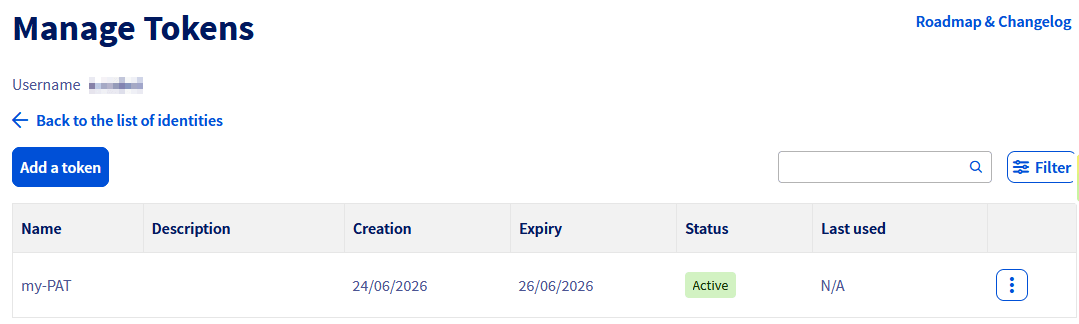
Delete a token
Deleting a PAT immediately blocks further API calls.
From the Manage Tokens page, click the more options … button at the end of the token row, then select Delete.
Click Delete in the confirmation window to revoke the token.
Replace {name} with the token name (for example, pat-my-script).