
Learn how to check the BMC firmware version on a dedicated server.
A BMC (Baseboard Management Controller) is responsible for the remote management and low-level control of the server hardware. An outdated version can directly impact security, stability, and manageability of the server. Keeping the BMC firmware updated is necessary to patch security vulnerabilities, maintain system stability, and meet compliance requirements.
Requirements
- A dedicated server in your OVHcloud account
- Administrator rights (sudo)
- Your dedicated server must be connected to the Internet (only if the
ipmitooltool is not already installed) - A TYAN S8056 motherboard
Due to our dedicated configuration, BMC upgrade is only performed by OVHcloud automation supervised by our technician; we do not provide any package or automated mechanism to do so.
On a Linux Server
First, you need to install the ipmitool package. This tool allows you to query the BMC via the IPMI interface. For more information, see the official documentation.
Depending on the Linux distribution, the command may vary:
Check the BMC firmware version using the following command:
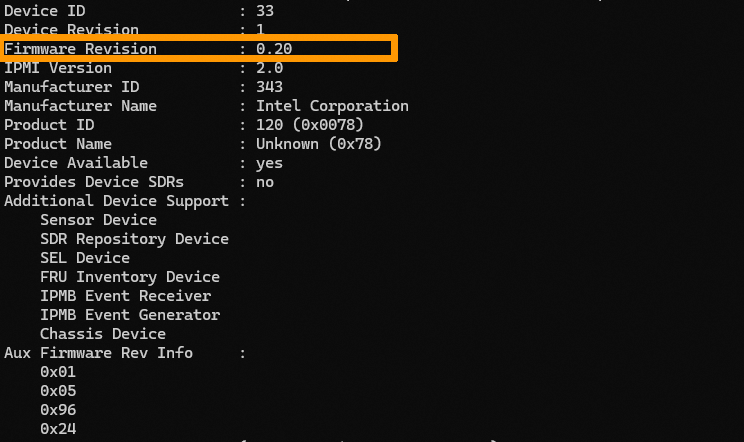
TYAN S8056 motherboard
- If your server uses a TYAN S8056 motherboard and the firmware version is equal to or lower than 1.14, please contact our support team by creating a support ticket to request a firmware update.
- If the version is higher than 1.14, no action is required.
On a Windows Server
Currently, we are only able to provide the procedure for servers running Linux operating systems. We recommend that you restart your Windows server in our rescue mode environment to check the version by following the instructions below.
On a Server in Rescue Mode
Once your server is restarted in rescue mode, install the ipmitool package.
Next, check the firmware version:
TYAN S8056 motherboard
- If your server uses a TYAN S8056 motherboard and the firmware version is equal to or lower than 1.14, please contact our support team by creating a support ticket to request a firmware update.
- If the version is higher than 1.14, no action is required.
Go further
For more information and tutorials, please see our other Dedicated Servers support guides or explore the guides for other OVHcloud products and services.